WhatsApp Contact Enricher with Notion
Enrich contacts instantly in WhatsApp groups. Type 'Find [Name], [Company]' to get LinkedIn URLs, emails, bios, and financials. Save to Notion.
Example starting point only. Verify every connection and any sending, booking, inventory, approval, or handoff action before deployment.
 Rithul Palazhi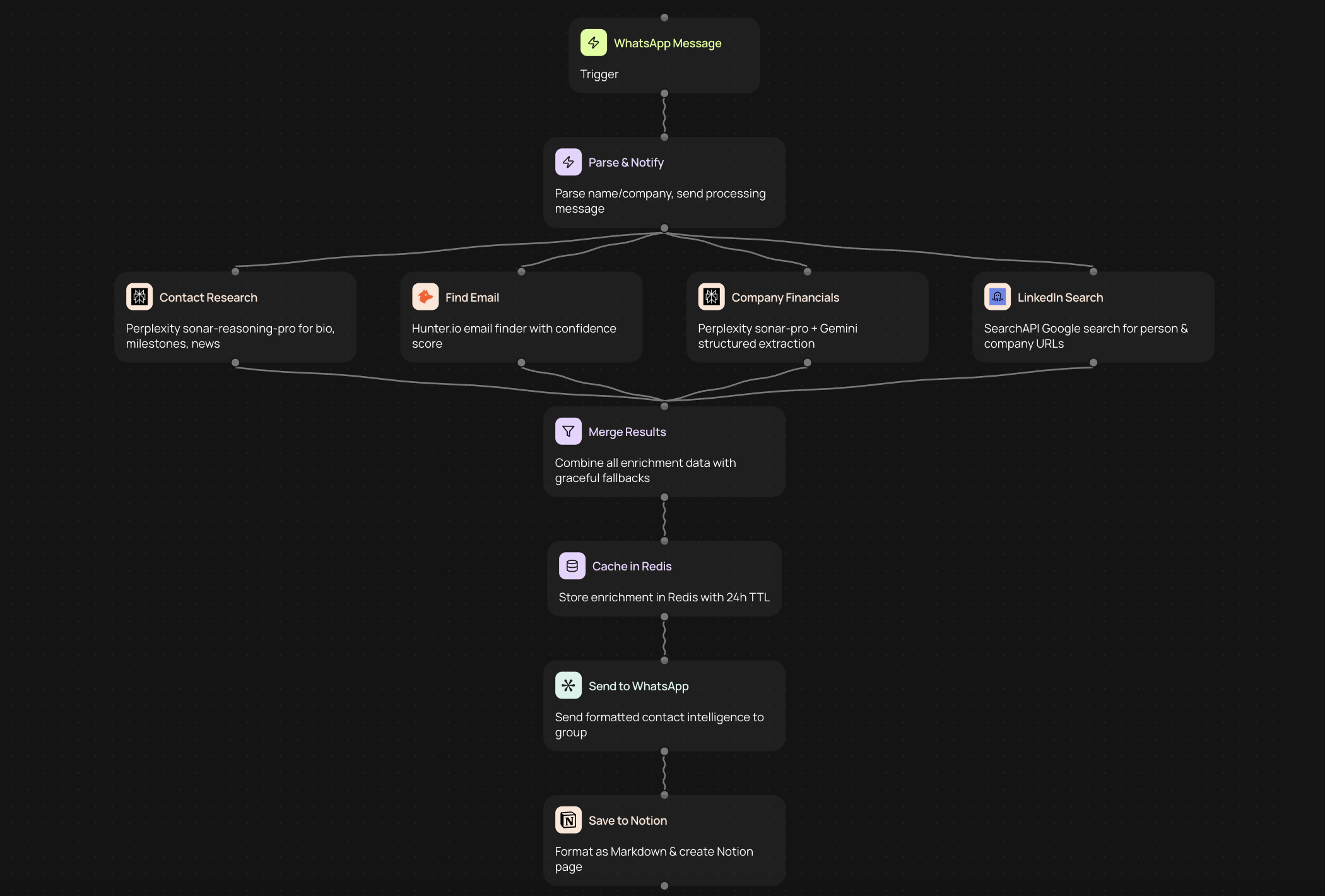
What is a WhatsApp contact enricher with Notion?
A WhatsApp contact enricher with Notion is an automated bot that works directly in your WhatsApp groups to find and organize professional contact information. When you type a simple command like 'Find [Name], [Company]', the bot uses AI to discover LinkedIn profiles, email addresses, professional bios, company financials, and other contact intelligence. You can then save this enriched data to your Notion workspace with an 'add to notion' command, creating a seamless workflow that keeps your contact database current without switching between multiple tools.
How does WhatsApp contact enrichment work?
The contact enrichment process starts when you send a message in your WhatsApp group following a specific format. The bot recognizes your command, searches multiple data sources using AI, and returns comprehensive information about the person and their company. This includes verifying current employment, locating social profiles, discovering contact details, and gathering relevant business intelligence. The entire process happens within seconds, and the information appears right in your WhatsApp conversation where your team can see it.
Who benefits from WhatsApp contact enrichment?
Sales teams use this tool to quickly research prospects before calls or meetings, ensuring they have accurate contact information and company context. Recruiters rely on it to find candidate details and verify employment history without leaving their communication platform. Founders and business development professionals leverage it to gather intelligence on potential partners, investors, or clients. Anyone who regularly needs to find and organize professional contact information can benefit from having this capability directly in WhatsApp.
Why use WhatsApp for contact enrichment?
WhatsApp is where many teams already communicate throughout their workday. By bringing contact enrichment into WhatsApp, you eliminate the need to switch between browser tabs, login to multiple platforms, or copy information between systems. Your team can collaborate on research in real time, share findings instantly, and maintain context within ongoing conversations. The familiar interface requires no training, and the bot responds as quickly as a team member would, making the entire process feel natural and efficient.
What information can you discover?
The enrichment bot finds LinkedIn profile URLs so you can view full professional histories and mutual connections. It discovers verified email addresses that increase your chances of successful outreach. Professional bios provide context about someone's role, expertise, and career trajectory. Company financials give you insight into funding, revenue, and growth stage. Additional contact intelligence may include phone numbers, social media profiles, recent news mentions, and organizational structure details that help you understand decision-making hierarchies.
How do you save enriched data to Notion?
Once the bot returns contact information in your WhatsApp group, you can save it to your Notion workspace by typing 'add to notion' as a follow-up command. The bot formats the data appropriately and creates or updates a record in your designated Notion database. This creates a permanent, searchable repository of contact information that your entire team can access. You can customize which Notion properties receive which data points, ensuring the information integrates with your existing systems and workflows.
Setting up your WhatsApp contact enricher
1. Connect your WhatsApp account to the CodeWords platform through a secure authorization process.
2. Configure the AI data sources you want to use for contact enrichment and intelligence gathering.
3. Connect your Notion workspace and specify which database should receive enriched contact records.
4. Map the data fields from enrichment results to your Notion database properties.
5. Set up the command format your team will use in WhatsApp to trigger contact searches.
6. Test the workflow by searching for a known contact and verifying the results.
7. Add team members to your WhatsApp group so they can start using the enrichment bot.
Best practices for contact enrichment workflows
Use consistent formatting when typing your search commands to ensure the bot understands your requests accurately. Include both the person's name and company name when possible, as this improves match accuracy significantly. Review enriched data before saving it to Notion to catch any potential mismatches or outdated information. Create naming conventions for your Notion database that make it easy to find contacts later. Share successful searches with your team so everyone benefits from the research others have already done.
Privacy and data compliance considerations
Contact enrichment tools gather publicly available information from professional networks and business databases. However, you should still maintain proper data handling practices, especially if you operate in regulated industries or jurisdictions with strict privacy laws. Only save contact information you have a legitimate business reason to retain. Inform contacts about how you discovered their information when appropriate. Review your Notion access permissions to ensure sensitive contact data is only visible to authorized team members.
Improving sales team efficiency
Sales teams waste significant time switching between LinkedIn, company websites, email finders, and CRM systems while researching prospects. A WhatsApp contact enricher eliminates this context-switching by delivering all relevant information in one place. Sales representatives can research prospects while traveling, between meetings, or during any moment when they have their phone available. The ability to quickly verify contact information reduces bounce rates on outreach campaigns and increases connection rates on calls.
Streamlining recruitment processes
Recruiters often need to quickly assess whether a candidate matches position requirements and verify their current employment status. Having instant access to LinkedIn profiles, professional bios, and contact information accelerates candidate screening. The connection to Notion creates an organized talent pipeline that tracks all candidates your team has researched. This historical record prevents duplicate work and helps you re-engage promising candidates for future opportunities.
Alternative approaches to contact enrichment
Traditional contact enrichment requires manual searches across multiple websites or subscriptions to expensive data platforms with complicated interfaces. Some teams use browser extensions that only work on desktop computers and require individual licenses. Others rely on virtual assistants to perform research, which introduces delays and communication overhead. A WhatsApp bot approach works on any device, requires no individual software installation, and delivers results instantly to your entire team simultaneously.
Integrating with your existing tools
While this workflow focuses on Notion as the storage destination, contact enrichment data can flow to other platforms your team uses. The same information discovered in WhatsApp can update your CRM records, populate email marketing lists, or enhance your sales intelligence platforms. CodeWords allows you to create multi-step automations where a single WhatsApp command triggers updates across several systems, ensuring all your tools maintain consistent, current contact information.
Getting started with CodeWords
CodeWords makes it simple to build this WhatsApp contact enricher without writing code or managing complex integrations. The platform provides pre-built connections to popular data sources, WhatsApp, and Notion. You design your automation using a visual interface that shows exactly how information flows from your WhatsApp command through enrichment services to your Notion database. The result is a custom tool that feels purpose-built for your team's specific needs and terminology.
Get started today
Your first workflow is free to build.
Describe what you need. Cody handles the build, the connections, and the deployment.