Stripe checkout LinkedIn enrichment — add LinkedIn profiles to your customer data
When a Stripe checkout completes, this workflow finds the customer's LinkedIn profile and adds it to PostHog. Works with company emails only.
Example starting point only. Verify every connection and any sending, booking, inventory, approval, or handoff action before deployment.
 Rithul Palazhi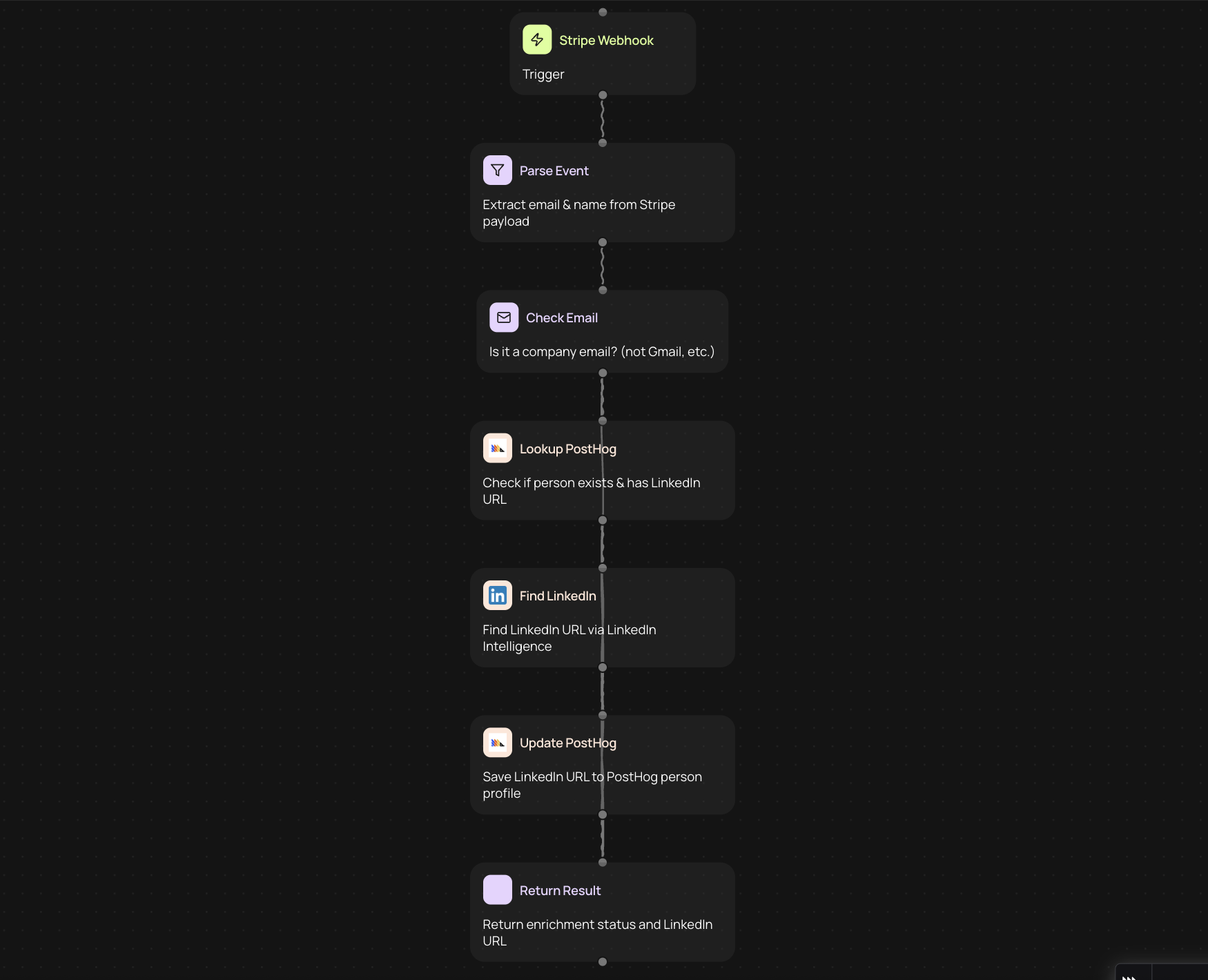
Enrich Stripe customers with LinkedIn profiles
Every time someone completes a Stripe checkout, this workflow checks whether they used a company email address. If they did, it finds their LinkedIn profile and writes the URL directly into their PostHog record. Free email providers like Gmail and Yahoo are filtered out, so you only enrich the contacts worth enriching.
The whole process runs in the background. No manual lookups, no copy-pasting between tabs. Your customer records in PostHog gain LinkedIn context without anyone on your team lifting a finger.
How the enrichment pipeline works
When a checkout.session.completed event fires from Stripe, the workflow extracts the customer's email and name. It checks the email domain against a list of 24 known free providers. Company emails pass through to the next step. Free emails stop here.
For company emails, it looks up the person in PostHog. If they already have a LinkedIn URL on file, the workflow skips them. If not, it calls the LinkedIn Intelligence service with the customer's name and the company name derived from their email domain. When a match is found, the LinkedIn URL is written back to PostHog via the capture API.
Built for B2B teams who use Stripe and PostHog
Sales teams get richer lead data without extra manual work. When a new customer signs up, their PostHog profile already includes a LinkedIn URL by the time the team looks at it. This makes outreach faster and more personalised.
Customer success teams benefit too. Knowing a customer's professional background helps with onboarding conversations. Growth teams can segment users by seniority or company type using the enriched LinkedIn data.
What you need to connect
The workflow needs access to your Stripe webhooks (checkout.session.completed events), your PostHog project credentials, and the CodeWords LinkedIn Intelligence service. Stripe and PostHog require your own credentials. LinkedIn Intelligence is built into CodeWords and needs no separate setup.
There's also a manual endpoint for testing individual enrichments. Pass an email and name, and it runs the same pipeline without waiting for a Stripe event.
Get started today
Your first workflow is free to build.
Describe what you need. Cody handles the build, the connections, and the deployment.