
Calendar to Docs Automation — turn meetings into instant notes

How does calendar to Docs automation save me hours?
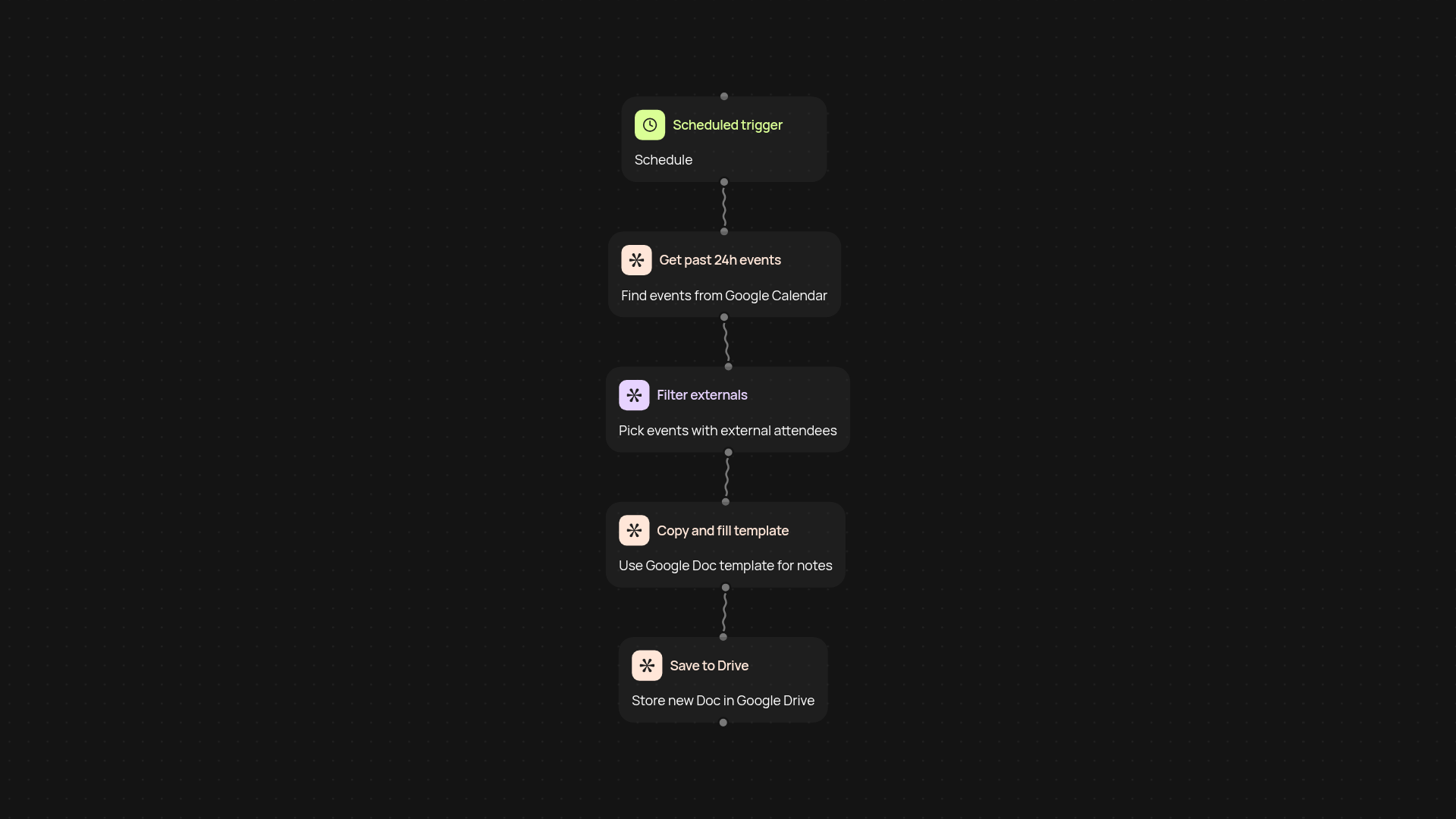
Get your meeting notes sorted without lifting a finger. This workflow searches your Google Calendar for recent meetings with guests outside your company—then instantly creates a Google Doc for each, formatted with your template. No more forgetting to take notes or copy meeting details. Your follow-ups are always ready, freeing up your mind for real work.
How does it tell which meetings need Docs?
The workflow scans the past 24 hours of your calendar, looking for events with external invitees. Only those meetings are captured—so you skip all the internal chatter and focus on what matters. It reduces clutter and makes sure your external meetings always have a doc trail.
What’s inside each generated Doc?
Every Doc uses a Google Drive template you choose. Details like title, attendees, and time are filled in instantly. You get consistency and a professional look, and can add your own sections or prompts for easy note-taking. Everything is organized and ready for sharing with your team or clients.
How do I set it up and what do I need?
Connect your Google Calendar and Google Drive in CodeWords. Pick your template Doc, set up the workflow in a few clicks, and you’re done. The automation runs on a schedule, so your Docs are always up to date—just make sure your Google accounts are connected. No technical setup, just a smarter way to run meetings.
Your next product is
one conversation away.
